Upwork Proposal Template: 10 High-Converting Formats by Job Type
A practical Upwork proposal template library with 10 job-type formats, customization rules, and faster tailoring workflow for freelancers.

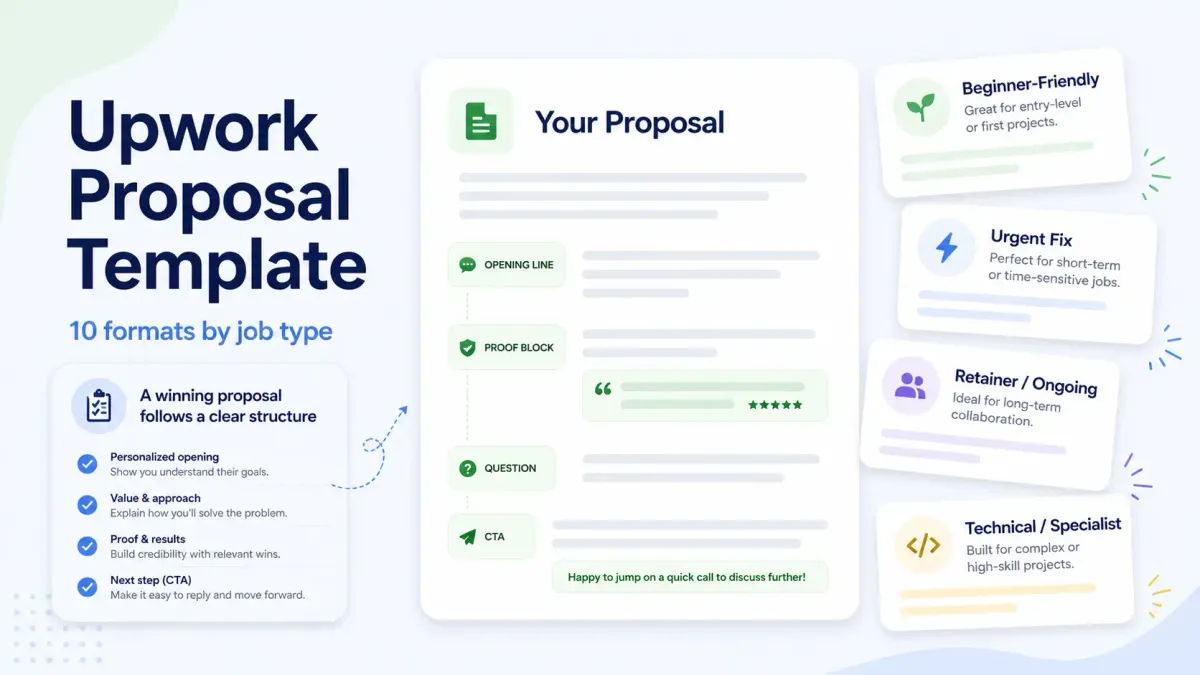
If you want the short answer first, here it is: the best Upwork proposal template is not one universal script. It is a structure that helps you match the proposal to the job type, prove fit fast, ask one smart question, and give the client a clear next step. A good template saves time. A bad one makes you sound like everyone else. It can improve speed and relevance, but it cannot rescue a low-fit job or guarantee replies.
This guide gives you 10 practical Upwork proposal templates by job type, plus a simple system for customizing each one without sounding copied.
Quick answer
- Best Upwork proposal template: the one that matches the job type, proof available, and client goal
- Best first sentence: one line that names the client's problem or desired outcome
- Best proof block: one example that is similar in scope, niche, or deliverable
- Best clarifying question: one question that helps define scope, risk, or timeline
- Best CTA: one next step such as sharing samples, outlining an approach, or discussing scope
An Upwork proposal template should help a freelancer open with relevance, show proof fast, ask one useful question, and end with a simple next step.
What makes an Upwork proposal template actually work
An Upwork proposal template works when it gives you structure without turning your pitch into filler.
Definition: what is an Upwork proposal template?
An Upwork proposal template is a reusable proposal structure for a specific type of Upwork job. It is not a copy-paste script. A good template keeps the core parts consistent while changing the opening line, proof, question, and CTA for each job.
Definition: what is a proof block?
A proof block is the part of a proposal that shows why the freelancer is credible for this exact job. It usually includes one relevant project, result, workflow, or sample that reduces client risk.
Definition: what is a clarifying question?
A clarifying question is one short question that helps define scope, constraints, or priorities before the client replies. It shows that the freelancer read the brief and is thinking about delivery, not just trying to win attention.
Upwork's own help content says your cover letter should describe what you can do for the client, ask questions about the project, and suggest next steps. Upwork also tells clients to review proposals based on skills, experience, work history, availability, budget fit, and timeline fit. That means a strong template has to do more than sound polite. It has to reduce risk for the client fast. See Upwork Help: How to submit a proposal on Upwork and Review proposals.
The strongest proposal templates usually have four parts:
- A relevant opening line that shows you understand the job
- A proof block that shows you have done similar work
- A clarifying question that moves the conversation forward
- A CTA that makes the next step easy
Here is a quick table you can use before the full templates.
| Job type | Template goal | Key elements |
|---|---|---|
| Beginner-friendly | Build trust without overclaiming | Honest fit, relevant sample, small next step |
| Urgent fix | Show speed and confidence | Immediate diagnosis, similar fix, timeline question |
| Long-term retainer | Show process and reliability | Ongoing support model, communication rhythm, KPI question |
| Portfolio-led creative | Make proof do the heavy lifting | Style match, sample link, taste question |
| Highly technical | Show precision | Architecture or debugging signal, stack proof, constraint question |
| Fixed-price scoped project | Reduce scope risk | Deliverables, assumptions, milestone question |
| Discovery or strategy | Sell thinking, not only execution | Audit angle, framework, access question |
| Rewrite or optimization | Show before-and-after thinking | Problem framing, measured improvement idea, baseline question |
| High-ticket expert work | Protect positioning | Niche proof, business impact, decision-maker question |
| Fast follow-up after invite | Keep momentum | Context acknowledgment, fit proof, scheduling CTA |
Before you use any Upwork proposal template, remove the default self-intro. Clients do not need "I am a hardworking freelancer with X years of experience" in the first line. They need a reason to believe you fit this job.
The four-part proposal framework
For most jobs, an Upwork proposal template works best when it follows this order:
- Opening line: identify the client's problem, outcome, or urgency
- Proof block: show one relevant example, result, or similar task
- Clarifying question: ask one question that sharpens scope or delivery
- CTA: suggest one easy next step
10 proposal templates by job type
1. Beginner-friendly template
Use this when: You are new to Upwork but have relevant skills, personal projects, or outside-client samples.
Opening line:
Hi, I can help with your Shopify product page updates, and I already have a sample workflow for this kind of task that I can share right away.
Proof block:
I am newer on Upwork, but I have already built similar product-page edits in my own test store and for one outside client. The work included image swaps, section cleanup, and mobile spacing fixes.
Clarifying question:
Do you already have the final copy and images ready, or do you want help organizing those too?
CTA:
If helpful, I can send a short action plan for the first three edits I would make before you hire.
Why it works: It does not fake authority. It uses honest proof and offers a low-risk next step.
Weak vs better example:
Weak: I am new here, but I am a fast learner and I can do anything you need.
Better: I am new on Upwork, but I already built two Shopify product-page samples with mobile cleanup, image replacement, and section edits, so I can start with the exact task you listed.
2. Urgent fix template
Use this when: The client has a broken page, bug, failed integration, or deadline-sensitive problem.
Opening line:
It looks like you need this Stripe webhook issue fixed quickly, not a full rebuild, and that changes how I would approach the job.
Proof block:
I have handled similar payment and webhook debugging work where the fastest win came from tracing the failed event flow first, then checking environment mismatches and retry logic before changing anything larger.
Clarifying question:
Do you already know whether the failure is happening at the webhook endpoint, the event mapping layer, or after the data reaches your app?
CTA:
If you want, I can review the likely failure points with you and tell you whether this looks like a 1-hour fix or a larger cleanup.
Why it works: It matches the client's urgency and shows diagnostic thinking instead of generic availability.
Weak vs better example:
Weak: I can start immediately and fix this as soon as possible.
Better: I would start by checking whether the webhook failure is happening before the event reaches your app or after the payload is received, because that tells us whether this is a config issue or a code-path issue.
3. Long-term retainer template
Use this when: The client wants recurring support in content, ads, SEO, email, design, or development.
Opening line:
You seem to need someone who can own this each week, not just complete one isolated task.
Proof block:
I work best in ongoing engagements where I can improve a system over time. For similar clients, that has meant a weekly rhythm, documented priorities, and clear reporting on what changed and why.
Clarifying question:
What matters more for this retainer in the first 30 days: speed, consistency, or measurable improvement in one KPI?
CTA:
If helpful, I can outline how I would structure the first month so you can see whether my working style fits your team.
Why it works: It positions you as a partner, not a task taker.
4. Portfolio-led creative template
Use this when: The client is hiring for design, branding, video, illustration, or copy where style fit matters.
Opening line:
Your brief reads like you need a cleaner, more premium visual direction, and style fit will matter as much as execution.
Proof block:
I have worked on similar brand and landing-page projects where the main challenge was aligning tone, layout, and conversion goals. I would lead with two samples that are closest to your aesthetic rather than sending a broad portfolio dump.
Clarifying question:
Do you want the final direction to feel closer to minimal and editorial, or bolder and conversion-led?
CTA:
I can send the two closest samples and explain why they match your brief before we decide on scope.
Why it works: It respects the fact that creative buyers choose on taste and fit, not only on tool lists.
5. Highly technical template
Use this when: The job is engineering-heavy, architecture-heavy, data-heavy, or security-sensitive.
Opening line:
This looks less like a general development task and more like a systems decision that needs the right tradeoff early.
Proof block:
I have worked on similar backend and infrastructure jobs involving API design, data flow cleanup, and performance bottlenecks. In those projects, the first step was mapping failure points and constraints before writing code.
Clarifying question:
What is the hardest constraint here: latency, data consistency, deployment risk, or compatibility with the current stack?
CTA:
If useful, I can sketch the likely implementation options and the tradeoffs I would check first.
Why it works: It signals engineering judgment, which matters more than a giant skills list.
6. Fixed-price scoped project template
Use this when: The client wants a defined deliverable with a set budget.
Opening line:
I can help with this as a fixed-scope project, but the quality of the outcome will depend on locking the deliverables clearly before work starts.
Proof block:
I have handled similar fixed-price jobs where strong scoping avoided revision loops. The most successful ones had clear deliverables, assumptions, and approval points from the start.
Clarifying question:
Do you already know the exact deliverables you want, or would it help if I suggested a cleaner milestone breakdown?
CTA:
I can turn your brief into a simple milestone structure so you can compare options before hiring.
Why it works: It protects both sides from vague scope and shows professionalism.
7. Discovery or strategy template
Use this when: The client is not ready for full execution and needs an audit, roadmap, or strategic direction first.
Opening line:
You may not need full implementation yet. You may need a cleaner diagnosis first so the next step is based on evidence instead of guesswork.
Proof block:
I have done similar audit and planning work where the value came from identifying bottlenecks, ranking priorities, and helping the client avoid low-return execution.
Clarifying question:
Do you want the output to be an audit only, or a ranked action plan your team can execute after?
CTA:
If useful, I can outline the exact questions, review areas, and deliverables I would include in a first-pass audit.
Why it works: It sells thinking and structure, not only task completion.
8. Rewrite or optimization template
Use this when: The client already has something live and wants better performance.
Opening line:
You already have an asset in place, so the question is not "can this be built?" but "what is holding it back right now?"
Proof block:
I have worked on similar rewrite and optimization jobs where the biggest gains came from fixing message clarity, flow, friction points, or weak calls to action rather than starting over.
Clarifying question:
Do you already know which part is underperforming, or do you want me to identify the likely drop-off points first?
CTA:
I can review the current version and point out the first three changes I would test before we scope the full project.
Why it works: It shifts the conversation toward measurable improvement.
9. High-ticket expert template
Use this when: The client is hiring for specialized work with higher budgets and higher risk.
Opening line:
This is the kind of project where the right specialist can save time and money, and the wrong hire can create a longer recovery later.
Proof block:
I focus on this area specifically, and my past work in similar environments has usually involved balancing business goals, stakeholder expectations, and execution quality without adding unnecessary complexity.
Clarifying question:
Who will judge success on your side: the founder, the ops lead, or a technical stakeholder?
CTA:
If the fit looks right, I can propose the best engagement structure for the level of risk and ownership this project needs.
Why it works: It protects your positioning and reframes price around risk.
10. Invitation or warm lead template
Use this when: A client invited you, messaged you first, or you have some warm context.
Opening line:
Thanks for the invite. I read the brief, and the part that stands out most is the need to improve handoff speed without losing quality.
Proof block:
That lines up with similar work I have done, especially where the real challenge was building a repeatable system instead of only delivering a one-time output.
Clarifying question:
Before I suggest the best approach, should I assume this is meant to become part of an ongoing workflow?
CTA:
Happy to send a short plan or jump into a quick chat if you want to compare approaches.
Why it works: It keeps the momentum of the invitation while still proving relevance.
How to customize each template without sounding copied
The easiest way to ruin an Upwork proposal template is to keep the skeleton but forget the job details.
Use this four-step edit pass before sending:
- Replace the first sentence with the client's actual problem, deliverable, or constraint
- Swap in one proof point that matches the job type, not your favorite generic example
- Add one real question that shows you noticed something specific in the brief
- Tighten the CTA so it matches the buying stage
Here is a simple before-and-after example.
Generic version:
I am interested in your project and believe I am the right freelancer for the job.
Better version:
You need a faster way to sort qualified applicants from low-fit ones, and your current spreadsheet process is probably slowing that down.
The second version sounds specific because it is anchored in the client's likely problem.
A fast customization checklist
Use this checklist before sending any proposal:
- Does the first sentence mention the client's real problem or outcome?
- Does the proof block match the same niche, tool, or deliverable?
- Does the question help define scope, timeline, or risk?
- Does the CTA fit the job stage: sample, plan, or call?
- Could these first three lines be sent unchanged to another client?
If the answer to the last question is yes, the proposal still sounds too generic.
For faster tailoring, keep a small proposal library with these reusable pieces:
- 5 to 7 opening-line patterns by job type
- 8 to 12 proof snippets from real past work
- 5 clarifying questions you can adapt by niche
- 3 CTA styles for audit, build, and retainer jobs
This is the point where UpCat can help. A practical workflow looks like this:
- An alert surfaces a new job that matches your niche
- You qualify the job before spending time on the proposal
- You choose the right template by job type
- You rewrite the first paragraph around the client's actual problem
- You pull in the closest proof snippet instead of starting from zero
That is more useful than treating AI as a one-click proposal generator. The real gain is faster tailoring on better-fit opportunities.
Also Read:
- How to Write an Upwork Proposal
- Upwork Cover Letter Samples
- Upwork Proposal Response Rate: What's Good and How to Improve It
Common template mistakes that lower reply rates
Most poor proposal results come from a few repeated template mistakes:
Using the same intro for every job
Clients can spot this fast. If your first line could fit 200 jobs, it is too broad.
Writing too much about yourself
The proposal is not your bio. It is a short case for fit.
Sending proof that does not match the brief
Any sample is not the same as relevant sample. Similarity matters more than volume.
Asking vague questions
"Let me know more details" is weak. Ask one question that helps define scope, risk, or outcome.
Ending without a clear next step
Do not make the client guess whether you want to chat, send examples, or propose a plan.
Forgetting the revision window
Upwork's help content says you can usually edit most parts of a proposal within six hours or until the client views it. That is useful if you catch a weak line early, but it is not a substitute for sending a clean first version. See Upwork Help: How to edit your proposal.
A faster workflow for tailoring proposals
If you want to write better proposals without spending all day on them, use this workflow:
- Qualify the job before you write
- Pick the nearest template by job type
- Rewrite the first sentence from the client's point of view
- Add one proof block that directly matches the work
- Ask one clarifying question
- End with one CTA
- Proofread for filler, tone, and obvious copy-paste language
A useful rule is this: if the first three lines of your proposal could be sent to another client unchanged, stop and rewrite.
This is also where the product CTA belongs. UpCat's AI proposal workflow can help you move from qualified job to adapted draft faster, so you are not starting from a blank page every time or sending the same structure to the wrong jobs. The value is not just writing faster. The value is spending more time on jobs that already have a credible chance of reply.
How UpCat and AI proposal support can help
Templates are helpful, but fit still matters more than speed alone.
UpCat is an independent browser extension for Upwork freelancers at upcat.app. It helps generate AI-written proposal cover letters and real-time job alerts. It is not affiliated with, endorsed by, or sponsored by Upwork Inc.
The best use of AI proposal support is not to generate a finished pitch you never review. It is to speed up the boring parts while keeping the important parts human:
- Matching the right template to the job type
- Pulling the most relevant proof snippet
- Drafting a sharper first paragraph
- Suggesting a useful clarifying question
- Helping you rewrite weak, generic lines
That matches Upwork's own guidance too. The platform notes that AI-generated proposals can be edited and should be reviewed so they reflect your actual style and accuracy. See Upwork Help: How to submit a proposal on Upwork and Upwork Help: The anatomy of a winning proposal.
Use AI for draft speed. Use your judgment for fit. If the job is weak, late, vague, or outside your proof base, no template will fix that.
Key takeaways
If you need the shortest version of this article, these are the points most worth quoting:
- An Upwork proposal template works best as a reusable structure, not a reusable script.
- The first sentence should identify the client's problem, not introduce the freelancer.
- The strongest proof block is the example that is most similar to the current job, not the most impressive past project.
- One useful clarifying question often does more than a longer self-introduction.
- Templates improve speed, but job fit still matters more than template quality.
FAQ
What is the best Upwork proposal template?
The best Upwork proposal template is the one that matches the job type. A good template helps you open with the client's problem, show relevant proof, ask a useful question, and suggest a next step. There is no single template that works best for every job.
Should I use the same proposal template for every job?
No. You can reuse structure, but not the exact wording. If you use the same proposal template for every job, your proposals start to sound generic. Keep the framework and change the opening line, proof, question, and CTA for each opportunity.
How long should an Upwork proposal be?
Most Upwork proposals work better when they are concise and specific. You usually do not need a long pitch. Give the client a reason to keep reading, a proof point, one clarifying question, and a clear next step. Short and relevant beats long and broad.
What should the first sentence of an Upwork proposal say?
The first sentence should reflect the client's problem, goal, or constraint. It should show that you read the brief and understand what matters in the job. Avoid opening with a biography or a generic claim about being hardworking.
Can beginners use templates without sounding generic?
Yes. Beginners can use templates well if they are honest about experience and anchor each proposal in the actual job. A beginner does not need fake authority. They need a clear fit, one relevant proof example, and a thoughtful next step.
Sources
- Upwork Help: How to submit a proposal on Upwork
- Upwork Help: The anatomy of a winning proposal
- Upwork Help: Review proposals
- Upwork Help: How to edit your proposal
- Upwork Resource Center: Upwork Cover Letter Guide: Samples and Inside Tips
Use UpCat's AI proposal workflow to adapt the right template to the right job faster.